



To understand why you need to start using Gemini Notebook, it helps to look at the limitations of standard Large Language Model (LLM) chatbots.
Standard LLM chatbots (like standard ChatGPT, Claude, or Gemini web interfaces) are trained on vast, public internet data. When you ask them a general question, they draw upon this massive statistical memory to predict an answer. However, when you feed them proprietary internal documents such as your company's strategic plan or a confidential financial forecast, they face distinct limitations:
Gemini Notebook (formerly known as NotebookLM) changes this paradigm entirely through Retrieval-Augmented Generation (RAG) grounded entirely in your uploaded sources. Instead of querying the entire public internet, Gemini Notebook treats your uploaded documents, PDFs, Google Docs, and web links as an exclusive, closed-loop knowledge base.
For leaders steering corporate strategy, operational efficiency, and team alignment, Gemini Notebook offers distinct advantages that elevate it far beyond a standard chat utility.
When managing budgets or corporate compliance, you cannot afford guesswork. Gemini Notebook locks its responses strictly to your uploaded files. If an answer cannot be found within your documents, the system acknowledges this rather than inventing plausible-sounding fabrications.
One of the foremost concerns for management when adopting AI tools is data leakage. Gemini Notebook is built with enterprise security in mind:
Instead of opening twenty different browser tabs or PDF files, managers can upload an entire portfolio of related materials such as competitor reports, financial sheets, and meeting notes - and query them simultaneously. Gemini Notebook instantly surfaces connections, contrasts data points across different departments, and highlights hidden risks that might slip past manual reviews.
Beyond answering queries, Gemini Notebook helps managers turn raw data into executive assets. It can automatically draft briefing documents, study guides, FAQ sheets, or structured summaries based entirely on your verified source material, drastically cutting down administrative overhead.
As a leader, your days are consumed by a constant stream of information: dense market reports, board decks, internal policy updates, strategic plans, and financial forecasts. Standard AI chatbots are great for quick, general questions, but they lack the context of your organisation’s proprietary data and often suffer from hallucinations when dealing with complex, multi-document analysis.
Enter Gemini Notebook: a secure, source-grounded workspace where your documents become the single source of truth.
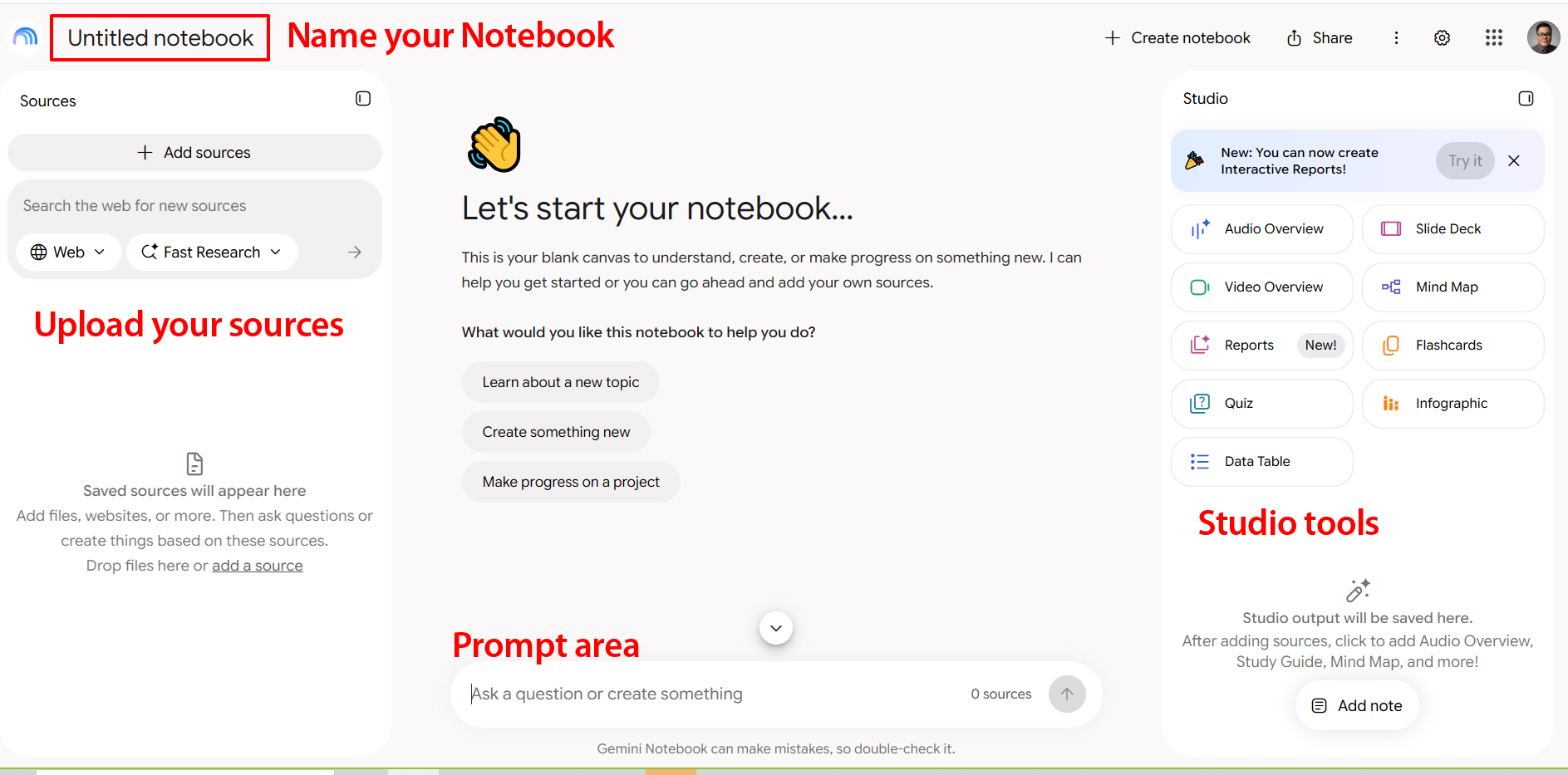
If you want to move beyond ad-hoc prompting and build a reliable intelligence hub for your team or personal workflow, here is a step-by-step guide to setting up your first executive notebook effectively.
Don’t throw every document you own into a single notebook. Just as you organise physical filing cabinets or digital drives, structure your notebooks around specific management domains.
Examples of Executive Notebooks:
By scoping each notebook tightly, you ensure the AI focuses only on relevant, high-priority context.
The golden rule of AI is garbage in, garbage out. Gemini Notebook allows you to anchor the AI’s answers strictly to the sources you provide.
If multiple managers or team members are contributing to a shared notebook, consistency is vital.
Before rolling out the notebook to your wider team or relying on it for high-stakes decision-making, test its comprehension. Run a few baseline queries using the built-in retrieval tools:
If the answers accurately reflect your documents with precise citations, your notebook is primed and ready for action.
As executive leaders, the challenge is rarely a lack of information, but rather making sense of it quickly, accurately, and securely. By moving beyond standard LLM chatbots and establishing a dedicated, source-grounded workspace, you can transform scattered documents into an active strategic asset. Setting up your first Gemini Notebook correctly is the vital first step toward reclaiming your time, eliminating guesswork, and ensuring your team operates from a single, verified source of truth.
Stay tuned for Part 2, where we dive into practical management use cases—showing you how to synthesise complex multi-page reports, prepare board briefings, and extract strategic insights in seconds.


